
A personal weather station is only as useful as its sensors and their location. Decide which measurements matter, confirm that the sensor and display belong to the same compatible system, then plan a site that is representative rather than merely convenient.
Choose the measurements you will use
Temperature and humidity need different exposure from rain and wind. Decide whether the goal is garden frost alerts, rainfall tracking, wind, indoor comfort or remote monitoring. More sensors create more maintenance and do not correct poor placement.
Forecast icons are derived from local trends and require time to learn conditions. They are not a substitute for official severe-weather warnings, aviation observations or emergency instructions.
Verify component compatibility
AcuRite publishes compatibility charts for sensor families, displays, add-ons and replacement parts. Match complete model numbers rather than connector shape or product appearance. A sensor from one family may not pair with another display.
Confirm whether smartphone access comes from a Wi-Fi display, hub or separate service. Outdoor sensors can report to a compatible display without internet, but remote features have network and account requirements.
Plan representative siting
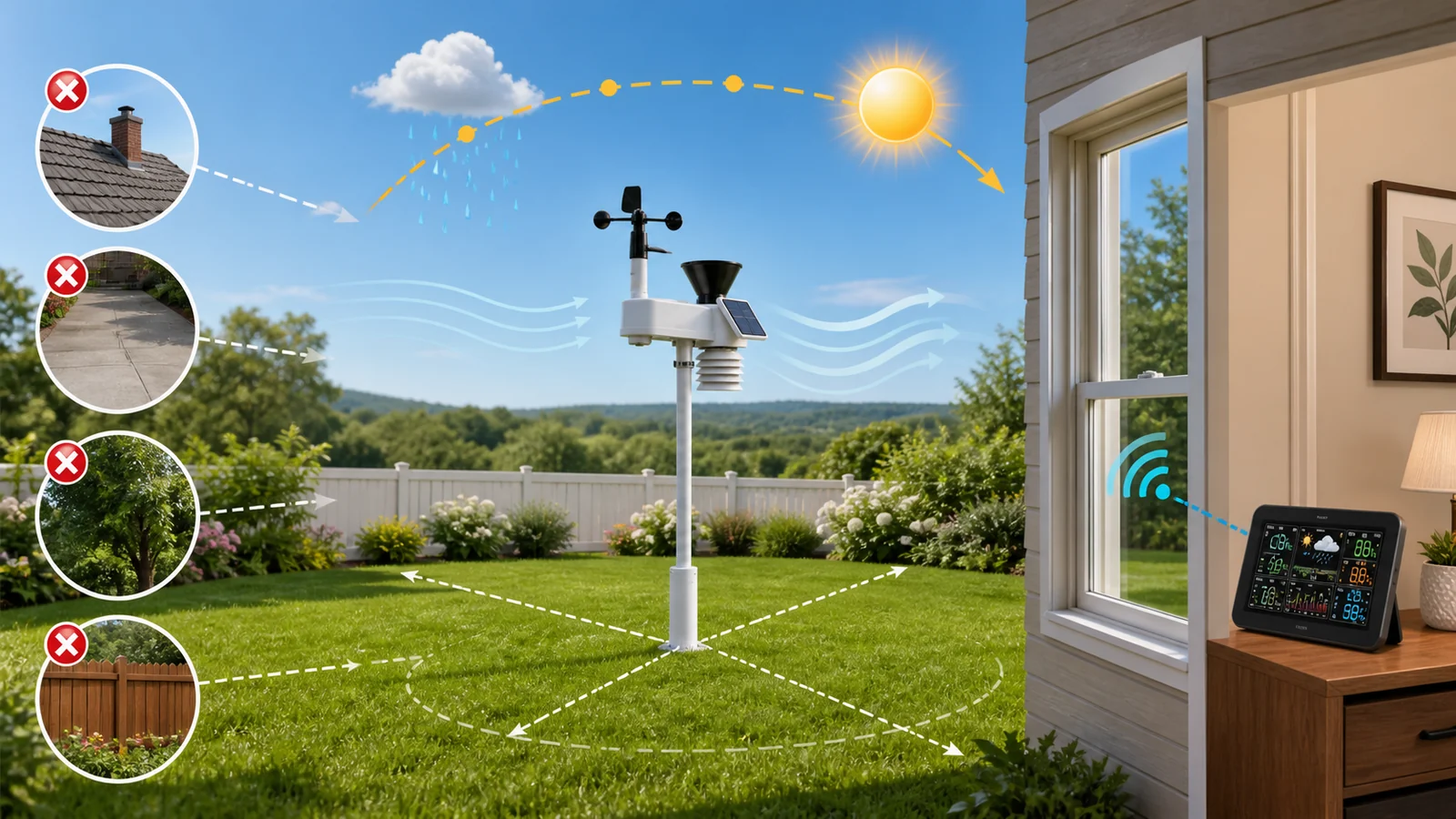
Temperature sensors should avoid direct sun, heat vents, roofs and dark pavement. Rain gauges need open sky away from branches and splash. Wind sensors need clearance from buildings and fences that create turbulence.
Professional standards use different mounting heights for different measurements, so a combined household sensor requires compromise. Document its position before comparing it with a distant official station.
Protect wireless range
Published line-of-sight distance is not guaranteed through walls. Metal siding, thick masonry, appliances and electronic interference reduce range. Test communication before drilling or installing a permanent mast.
Keep the display dry and leave practical access for batteries and resets. Mount the outdoor unit firmly, level the rain collector where required and use hardware suitable for wind exposure.
Maintain data quality
Inspect the rain funnel, debris screen, wind cups, vane and radiation surfaces. Remove leaves, nests and dirt without changing calibration. Replace batteries before a critical season using the recommended chemistry.
After maintenance, compare trends rather than forcing an exact match with an airport station at a different elevation and surface. Sudden step changes can indicate siting, battery or sensor problems.
Read warranty boundaries
AcuRite’s current policy gives the Optimus line a limited lifetime original-purchaser warranty, with consumable components excluded. Other products can use different periods, so check the exact page, manual and country.
Keep proof of purchase and serial information. Damage from weather events, poor installation, tampering or unauthorised repair can fall outside coverage, and return transportation can be the purchaser’s responsibility.
Make a purchase worksheet
Put the exact model or plan in the first column, the official specification in the second and your real requirement in the third. Mark every assumption that still needs confirmation from support. This prevents a feature from a related product, another country or an older version being applied to the item in the basket.
Add the delivered price, required accessories, likely replacement parts or consumables, subscription or renewal cost and an appropriate return-cost allowance. Recheck the worksheet immediately before payment because inventory, bundles, policy language and compatibility can change after research.
Comparison checklist
| Decision | Check | Risk if ignored |
|---|---|---|
| Purpose | Required measurements and alerts | Unused complexity |
| Compatibility | Exact sensor, display and add-on models | Components do not pair |
| Site | Sun, surface, obstructions and height | Biased readings |
| Range | Real walls and interference | Missing data |
| Service | Cleaning, batteries and access | Gradual inaccuracy |
Who should buy—and who should not?
AcuRite can suit a household that can provide a representative site and maintain the equipment. A simple thermometer may be better for one-room needs, while safety-critical, agricultural or research decisions require calibrated equipment and authoritative forecasts.
Before checkout
- Confirm the exact model, size, platform, capacity or configuration.
- Calculate the full delivered and ownership cost, including accessories, replacements and renewal.
- Read the current return, cancellation, warranty and regional terms for the exact purchase.
- Save the specification, policy and order confirmation that control the transaction.
Compare current store offers and browse related shopping categories before visiting the retailer.
How this guide was researched
CouponzWorld reviewed official product, policy and support material, separated merchant facts from editorial advice, and checked the cited sources on 14 August 2026. We did not treat temporary prices as permanent or claim hands-on testing.