
Configure a computer from the workload backward. Model-family names indicate positioning, but the processor, memory, storage, graphics, display and service options inside the final cart determine whether a Dell system fits the job.
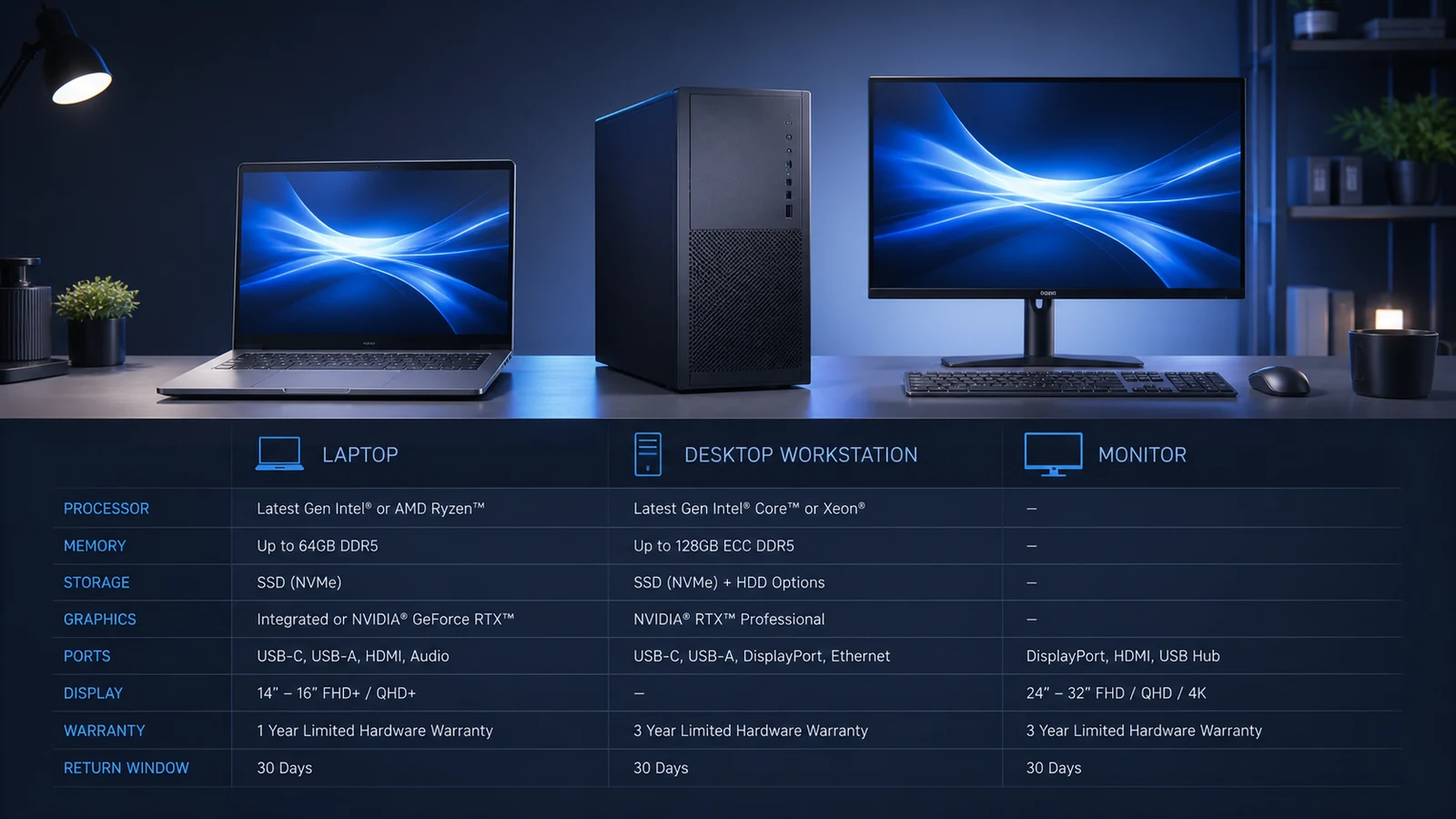
Translate tasks into requirements
List applications, file sizes, external displays, travel, battery, gaming, engineering or creative workloads. Office use and web study need different sustained performance from video production, CAD, data science or modern games.
Check the software publisher’s recommended—not merely minimum—processor, memory, graphics and operating-system requirements. Leave capacity for updates and multitasking.
Balance processor, memory and storage
Compare the exact CPU generation and model, not Core i5 or Ryzen 7 alone. Core count, architecture and power class affect performance and battery. Memory capacity matters for large projects and multitasking; verify whether it is soldered or upgradeable.
An SSD improves responsiveness, but capacity must include applications, working files and backups. Confirm the number of drives or slots and whether later upgrades affect support.
Choose graphics and display together
Integrated graphics can suit office and media workloads, while supported professional or gaming applications may benefit from a discrete GPU. Check power supply, cooling and application certification for a workstation.
For displays, compare resolution, size, panel, brightness, color coverage, refresh rate and connectors. A high-resolution panel can reduce battery life; a monitor with USB-C may need enough power delivery for the selected laptop.
Audit ports, mobility and accessories
Count USB-A, USB-C or Thunderbolt, HDMI, DisplayPort, Ethernet, audio and card-reader needs. Add the cost of a dock, adapter, webcam or charger when the built-in selection is insufficient. Check dimensions and starting weight with the actual battery and power adapter.
Match support to downtime cost
Review the included limited hardware warranty and optional support service description for response method, accidental damage, on-site coverage and term. Consumer and business services are not interchangeable.
Dell’s current U.S. policy states that eligible direct purchases generally require return initiation within 30 days of invoice, with exclusions. Save the invoice, configuration and service tag, and test ports, display, battery and workload during that window.
Test the decision against real use
Before committing, describe the first week of ownership or use. Identify who will install, configure, wear or apply the purchase, what existing products it must work with and which result can be checked objectively. This exposes hidden requirements that a category page may not mention.
Choose a lower-risk alternative when an essential measurement, ingredient, configuration or policy remains unclear. Contact support with the exact SKU and one specific question, then retain the written answer. Do not assume that advice for a similar model, size or formula also applies to the selected item.
Calculate the complete cost and risk
Compare alternatives using the same specification, quantity, service level and timing. Add delivery, tax, installation, accessories, subscription renewal, care supplies and any likely return expense. A headline saving can disappear when a necessary component is excluded or the wrong choice cannot be returned economically.
Classify decisive facts as confirmed, uncertain or not applicable. Resolve uncertainty through the current official page or written support before payment. Product reviews can reveal questions, but they do not replace the model-specific specification, ingredient label, size chart or policy.
Save evidence and inspect promptly
Keep the selected page, SKU or configuration, cart, policy, date and confirmation. Recheck all of them at checkout because stock and terms can change. Photograph delivered packaging, labels, contents and damage before installation, use, washing or disposal. Report a problem within the merchant’s stated window.
| Decision | Verify | Risk if missed |
|---|---|---|
| Identity | Exact model, size, shade or formula | Wrong product |
| Fit | Dimensions, compatibility or intended user | Unusable purchase |
| Total cost | Required extras and recurring charges | False saving |
| Remedy | Return, warranty and support route | Limited recovery |
| Evidence | Pages, labels, receipt and photos | Difficult claim |
Final checklist
- Confirm every model, measurement, ingredient, size or configuration.
- Read current exclusions before opening, installing or using.
- Calculate the final delivered and ownership cost.
- Save the order evidence and inspect immediately.
Compare current Dell offers, browse related categories and read more CouponzWorld shopping guides.
How this guide was researched
CouponzWorld reviewed official Dell product, support and policy information on 15 August 2026. Changing prices are not treated as permanent, merchant facts are separated from editorial guidance and no hands-on testing or medical advice is claimed.