
DocHub combines browser-based PDF editing, form filling, document signing and team workflows. The right plan depends less on one impressive feature than on document volume, signature responsibilities, template reuse, integrations and the sensitivity of the files being handled.
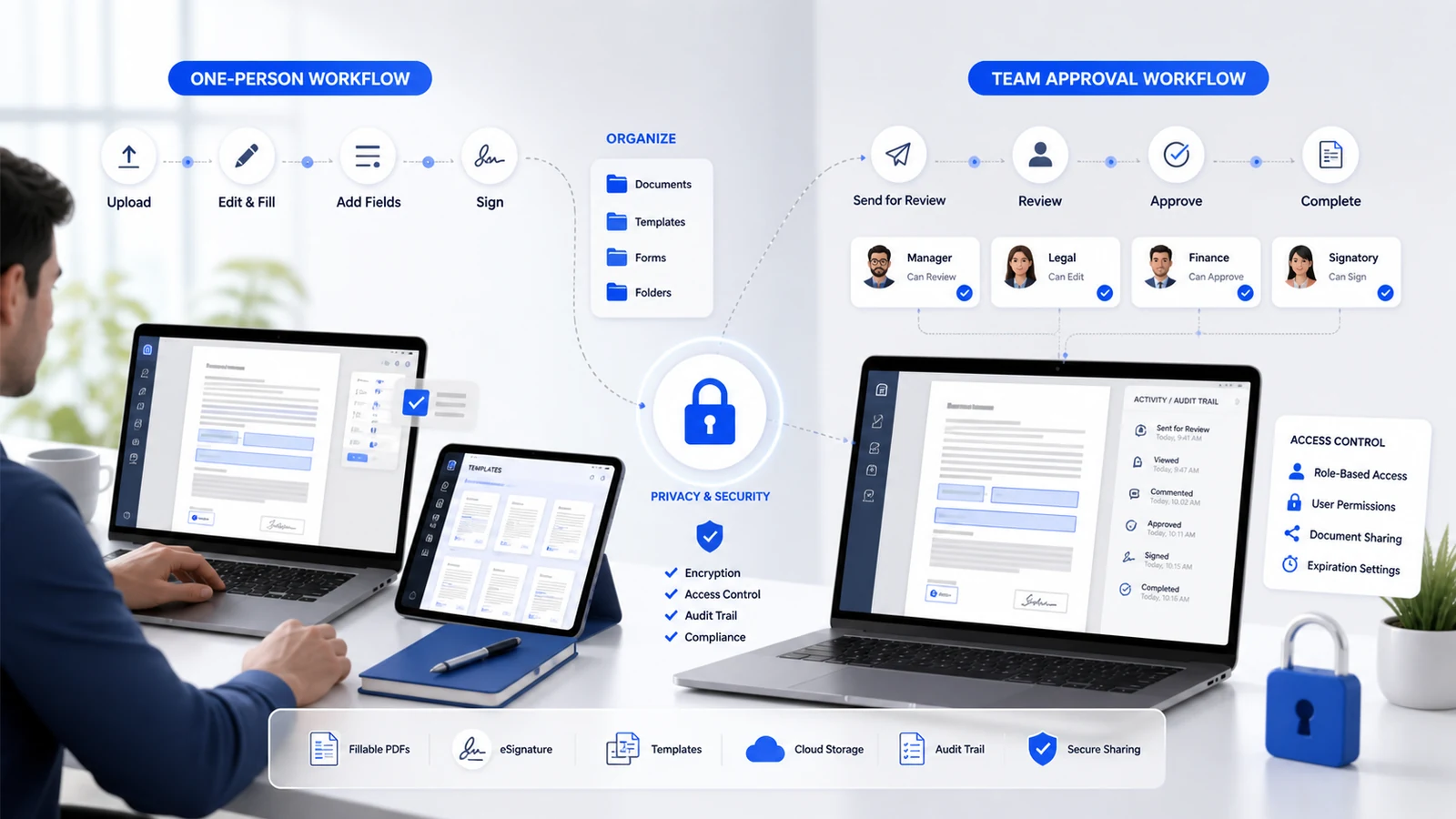
Map the document workflow first
List where documents originate, who edits them, who signs, who approves and where the final copy must be stored. A solo user annotating occasional PDFs has a different requirement from a department sending reusable forms to external recipients.
Test a complete real-world workflow during the trial: import a representative PDF, add fields, request a signature, receive the completed file, inspect the audit information and export it to the intended storage location.
Separate editing from signing needs
| Task | Evidence to test | Plan question |
|---|---|---|
| PDF editing | Text, pages, annotation and field behaviour | Does the document render correctly? |
| Self-signing | Saved signature and placement | Is the process quick enough? |
| Signature requests | Recipients, reminders and status | Are limits suitable for monthly volume? |
| Templates | Reusable fields and copies | Will they reduce repetitive setup? |
| Team review | Roles, ownership and hand-off | Can access be controlled cleanly? |
Compare limits, not just feature names
Free, individual paid and organization options can differ in document, signature, envelope, template, storage or collaboration limits. Read the current pricing page and account dashboard because product packaging can change. Estimate normal months and peak months; a plan that works during quiet periods may constrain a deadline-heavy team.
Check whether unused capacity carries forward, how upgrades apply, and what occurs after cancellation. Record the renewal interval, currency, tax and administrator who owns the subscription.
Review integrations carefully
DocHub can connect with cloud storage and productivity tools, but an integration is valuable only when it preserves the correct file version and permissions. Test import, editing, naming, export and duplicate handling. Decide whether completed records remain in DocHub, move to another repository or require both copies.
For shared drives, establish a naming convention and a single source of truth. Avoid emailing uncontrolled attachments after introducing a managed signing workflow.
Treat security and compliance as requirements
Identify personal, financial, contractual, educational or health information before upload. Review authentication options, session management, sharing controls, retention, audit evidence and the vendor documents required by your organization.
A general security statement is not the same as coverage for a regulated workflow. DocHub describes SOC 2 and GDPR-related safeguards; HIPAA use requires the applicable organizational arrangement and a Business Associate Agreement. Obtain legal, privacy or security approval where necessary rather than assuming a standard personal plan is sufficient.
Design team ownership before rollout
Use named administrators, least-privilege roles and a documented offboarding process. Decide who can create templates, send requests, view completed documents and manage billing. Test what happens when an employee leaves or a document owner changes.
Keep an audit log of key configuration decisions and review access periodically. Automation should reduce manual steps without hiding accountability.
Evaluate document quality and accessibility
Check complex tables, fonts, scanned pages, checkboxes and mobile signing. OCR may help scanned files, but verify every important value. Make field labels and instructions understandable, use a logical tab order, and provide an alternative process where accessibility requirements are not met.
DocHub decision checklist
- Test one complete representative workflow.
- Count monthly documents, requests, templates and team members.
- Confirm storage, export and integration behaviour.
- Review access, retention and compliance requirements.
- Record renewal owner, billing cycle and cancellation date.
See current DocHub offers, browse software and VPN services, and compare current deals before subscribing.
How this guide was researched
CouponzWorld reviewed DocHub official pricing, product, billing and organizational-plan material on 15 August 2026. Features, limits and compliance arrangements must be confirmed for the selected account.
Official sources
Make the final DocHub decision
Select the smallest plan that supports the verified workflow with enough peak capacity and correct governance. Save the pricing and feature pages at purchase, assign an owner, and schedule a review before renewal so convenience does not turn into unused recurring cost.
Keep a decision record
Before checkout, save the exact product or plan name, selected variant, final price, controlling terms and the date checked. Mark each important requirement as confirmed, uncertain or not applicable. Resolve any uncertainty that could change eligibility, safety, compatibility, cancellation rights or total cost through current official documentation or written support. Keep the confirmation and receipt after purchase so a later return, warranty request, billing question or service claim can be compared with the information available when the decision was made.