
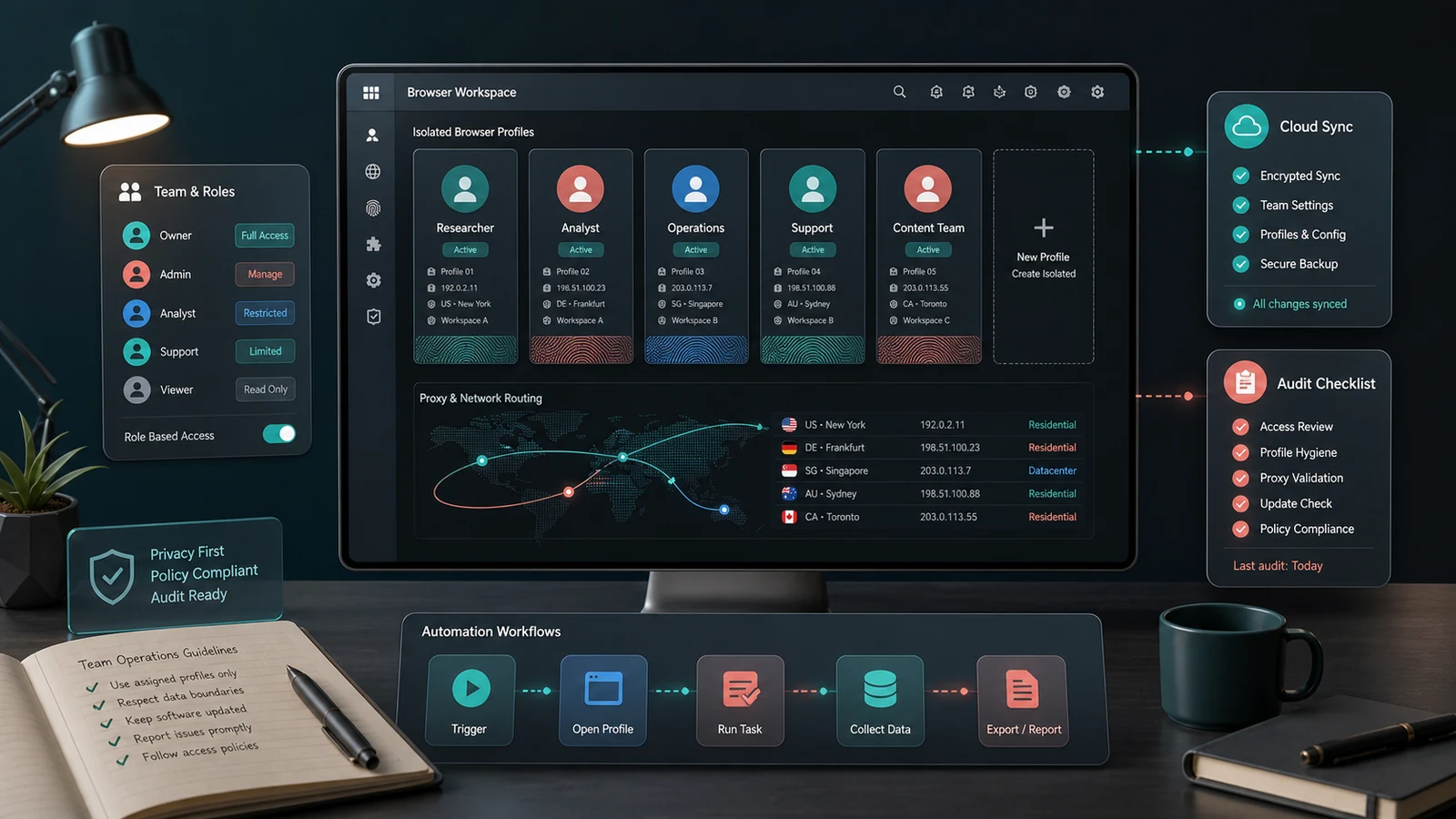
Dolphin Anty is designed to organize isolated browser profiles, proxies, team access and repeatable workflows. It should be evaluated as an operations tool for accounts you are authorized to manage. It does not replace the rules of advertising platforms, marketplaces, social networks, employers or clients.
Define a permitted use case
Write down the business purpose, account owner, approved users, data categories and governing platform policies. Legitimate examples can include agency-managed client workspaces, localization testing, support environments and separated brand operations when the account owner and platform allow them.
Do not use profile isolation to impersonate people, bypass enforcement, evade account restrictions or conceal unauthorized activity. Obtain written client authority and review applicable terms before building the workspace.
Size the profile requirement
| Requirement | Question | Operational risk |
|---|---|---|
| Profiles | How many active identities are genuinely needed? | Unused profiles increase cost and clutter |
| Users | Who needs owner, editor or view access? | Broad access weakens accountability |
| Devices | Where will approved work occur? | Unplanned access creates security alerts |
| Automation | Which repeatable actions are permitted? | Fast automation can scale mistakes |
| Retention | When should profiles and data be removed? | Old data increases exposure |
Test isolation and consistency
Create a small pilot with non-sensitive test accounts. Check browser version, extensions, locale, timezone, cookies, downloads and storage behaviour. A profile should remain consistent for its assigned authorized purpose; constant changes can create instability and make troubleshooting difficult.
Document the approved configuration rather than relying on memory. Apply updates in a controlled window and confirm that extensions and automations still behave as intended.
Choose and govern proxies separately
Proxy service is a separate decision from the browser-profile subscription. Assess provider legitimacy, ownership, geography, authentication, uptime, privacy terms and acceptable-use policy. Low-cost unknown proxies can expose credentials, create inconsistent location signals or introduce abuse history.
Assign a proxy only where there is a real business need. Record which profile uses it, who approved it and when it should be reviewed. Never treat a proxy as permission to bypass geographic, contractual or account restrictions.
Control team access
Use individual user accounts and the least privilege required. Separate billing, configuration, day-to-day operation and audit roles where the plan supports them. Remove access promptly when a project ends, rotate shared secrets and review active sessions.
Cloud synchronization makes collaboration convenient but also increases the importance of endpoint security. Require strong unique passwords, multi-factor authentication where available, encrypted devices and a clear incident process.
Automate only stable, allowed work
Dolphin Anty provides API and automation capabilities on applicable plans. Begin with a manual documented workflow, define success and failure states, and add limits, logging and human review. Avoid automating consent, identity, payment or policy decisions that require a person.
Test with a small batch and stop on unusual responses. Rate limits, interface changes and platform rules can change; an unattended script can create many incorrect actions before anyone notices.
Compare plans using total operating cost
Profile allowances, extra users, synchronization and automation access vary by plan. Include proxy subscriptions, staff time, secure devices, monitoring and training. A larger plan is not better when governance and authorized demand do not justify the capacity.
Governance checklist
- Document account ownership and platform permission.
- Assign every profile to a named purpose and responsible user.
- Use reputable proxies only when genuinely required.
- Apply least privilege, logging and scheduled access reviews.
- Test automation on a limited authorized sample.
Compare current Dolphin Anty offers, browse software and privacy-tool categories, or review current deals.
How this guide was researched
CouponzWorld reviewed Dolphin Anty official plan, documentation and product material on 15 August 2026. This guide promotes authorized, policy-compliant account operations and does not recommend evasion or impersonation.
Official sources
Make the final workspace decision
Choose Dolphin Anty only after the use case, permissions, data controls and operating owner are clear. Start with the smallest pilot that proves the workflow, then expand profiles or automation only when audit evidence shows a real need and acceptable risk.
Keep a decision record
Before checkout, save the exact product or plan name, selected variant, final price, controlling terms and the date checked. Mark each important requirement as confirmed, uncertain or not applicable. Resolve any uncertainty that could change eligibility, safety, compatibility, cancellation rights or total cost through current official documentation or written support. Keep the confirmation and receipt after purchase so a later return, warranty request, billing question or service claim can be compared with the information available when the decision was made.