
Size an EcoFlow US backup system by essential loads, starting surge, usable capacity, runtime, charging, solar input, safe connection and warranty.
Inventory essential loads
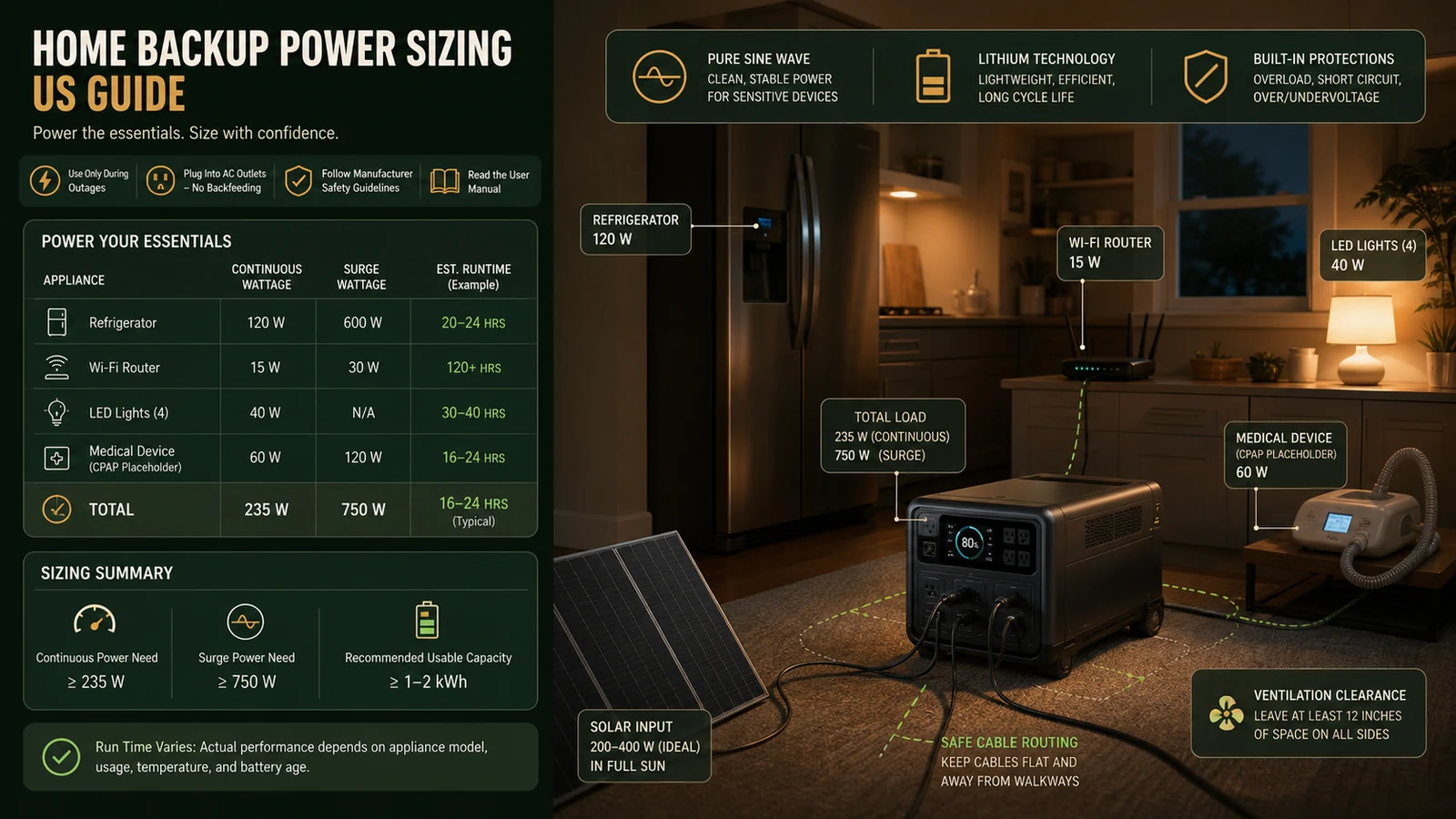
List only equipment that must run during an outage: refrigeration, communications, lighting, medical or accessibility equipment, heating controls and limited electronics. Read actual labels or reliable meters. Separate continuous watts from starting surge. Do not size from a marketing bundle name or the home’s total utility bill.
Calculate usable energy and runtime
Battery watt-hours divided by load watts gives only a theoretical starting point. Inverter losses, temperature, battery reserve, cycling loads and age reduce runtime. Model a conservative scenario and a longer outage. Prioritise intermittent operation where safe. Medical-device users should confirm power quality, runtime and backup requirements with the device provider.
Check output and surge together
Total AC output must support simultaneous running load, and surge capability must start compressors or pumps. Verify voltage, frequency, outlet count and DC or USB needs. Avoid daisy chains and overloaded extension cords. High-draw heaters and cooking appliances can consume capacity quickly; compare their value with preserving refrigeration and communications.
Plan charging options
Compare wall charging time, generator compatibility where permitted, vehicle charging and solar input limits. Solar production depends on panel rating, orientation, shade, weather, cable loss and season. Record connector and voltage/current limits before combining panels. Never exceed the power station’s specified input range.
Use safe home connections
Portable power stations should feed appliances directly through approved cords unless a listed transfer solution is installed by a qualified professional. Never backfeed a household outlet. Provide ventilation and keep equipment dry, stable and away from heat or combustible material. Follow local electrical and fire requirements.
Design the outage routine
Label priority outlets, store manuals and cables together, and practise a controlled setup before an emergency. Check state of charge regularly and update firmware only when appropriate. Decide who monitors remaining hours and disconnects nonessential loads. Maintain separate plans for evacuation, extreme temperature and communications failure.
Review battery care and support
Follow storage-charge, temperature and inspection instructions. Stop using a swollen, damaged, wet or abnormal-smelling battery and contact support. Confirm seller, model, serial number and US warranty terms; regional products may not receive the same service. Keep proof of purchase and photographs.
EcoFlow US decision table
| Decision | Verify | Why it matters |
|---|---|---|
| Loads | Continuous and surge watts | Overload or shutdown |
| Energy | Usable Wh and conservative runtime | Outage ends early |
| Charging | AC, vehicle and solar input limits | Slow or unsafe charging |
| Connection | Direct loads or professional transfer | Electrical hazard |
| Support | US seller, model and proof | Rejected warranty |
Compare current EcoFlow US Home Backup offers, browse related shopping categories, and review current coupons and deals.
How this guide was researched
CouponzWorld reviewed official product, policy and support material on 15 August 2026, separated merchant facts from editorial guidance, and did not treat temporary prices as permanent.
Official sources
Final verification record
Immediately before payment, save the exact product or service, selected edition or model, region, final price, included items, controlling terms and the date checked. Mark important requirements as confirmed, uncertain or not applicable. Resolve every uncertainty that could change safety, compatibility, eligibility, cancellation rights, data protection or total cost through current official documentation or written support. Keep the receipt and confirmation so a later claim can be compared with the information available when the decision was made.
Recheck the final basket rather than relying on an earlier category page. Availability, taxes, subscriptions, accessories and promotional conditions can change between research and checkout. Compare alternatives against the same specification, time period and support level; otherwise the apparent winner may simply include less. Include delivery, setup, required accessories, recurring supplies, conversion charges and realistic support costs before ranking the options. Save screenshots of any condition that materially affects your choice.
Run a limited pilot before moving an important workflow, expensive order or safety-critical load. Record the result, exceptions and staff time. A controlled test reveals missing compatibility, unclear responsibilities and recurring work that a feature list cannot show, while preserving a practical fallback if the preferred option fails.